
Visualization / Assists
Dynamic Values
Insert parameter values, filter selections, today's date, the user and the report name into text, shapes, image URLs and web page addresses.
A dynamic value is a placeholder in double braces that the report replaces when it opens and whenever filters or parameters change: Sales report for {{filter.Region}}, {{date:YYYY-MM-DD}}.
Insert one
In Text and Shape, use Style → Content (or Text) → Insert dynamic value; in Rich text, the toolbar’s Insert dynamic value. Or type the placeholder.
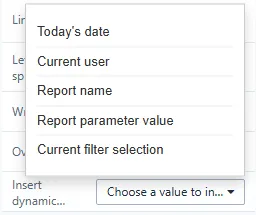
| Placeholder | Becomes | Menu item |
|---|---|---|
{{param.NAME}} |
The value of a report or global parameter, or a system variable such as {{param.system.username}} |
Report parameter value |
{{filter.NAME}} |
The selection of the filter component whose title or field is NAME; when that filter is All or there is no such filter, the members selected in a chart on the page (cross-filtering) for the field NAME; All when nothing is selected | Current filter selection, and the Chart fields (cross-filter) group |
{{date}}, {{date:FORMAT}} |
The date and time the report was opened or refreshed; default format YYYY-MM-DD |
Today’s date |
{{user.name}} |
The signed-in user | Current user |
{{page.title}} |
The report name | Report name |
Date format codes: YYYY, YY, MM, M, DD, D, HH, H, mm, ss. Example: {{date:DD/MM/YYYY HH:mm}}.
If the report has parameters or filters, the menu lists each by name. Otherwise the inserted placeholder has no name ({{param.}}); type the name after the dot.
How they are shown
- In the editor you see the placeholders; in the report you see the values.
- An unknown parameter or filter name stays visible in the editor and is blank in the report.
- Several selected filter values are joined into one text.
- A parameter’s value comes from a filter bound to it, then the URL (
?NAME=value), then its default. - In Image URLs and Web page addresses the values are URL-encoded.
Where they work
Text, Shape text, Rich text, Image URL, Web page address, and the rules of Visibility. Component titles use a different syntax, ${NAME}; see Parameters in component titles.
Related: Creating Parameters · Text