
Embedded
Report URLs (open, edit, embed)
URLs that open a report in view, edit or embed mode, their URL options, and how the user is signed in when a report is embedded.
Every report can be opened directly in a browser tab or an iframe by URL. These URLs return the report page (HTML), not data.
Open a blank report designer
http://your-server:28080/datafor/plugin/datafor/api/createDo
Open a report
URL format: <server url>/plugin/datafor/api/<mode>/<report id>?<option>&<option>
<server url>: the base address, for examplehttp://your-server:28080/datafor(28080is the default port).<mode>:- open: view mode, with the report toolbar.
- edit: edit mode (report designer). The user needs edit permission.
- integrate: embed mode, without toolbar. Use it to embed the report in another page with an
iframe.
<report id>: the report’s repository path, Base64 encoded, see below.
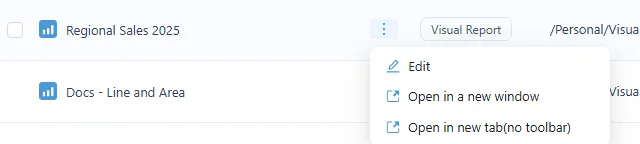
In the console’s file list, a report’s action menu has Open in a new window, which opens the open URL, and Open in new tab(no toolbar), which opens the integrate URL. Copy the URL from the new tab.
URL options
Note: __ is two underscore characters.
| Option | Modes | Effect |
|---|---|---|
locale=<language> |
all | UI language, for example locale=en-US or locale=zh-CN. Without it, the user’s language is used. |
__compact=true |
integrate | Removes the outer margins of the report page. |
__clean=true |
integrate | Removes the shadow around the report page. |
__forceAdjust=true |
integrate | Fits the report to the width of the window or iframe. |
__device=mobile |
open, integrate | Shows the report’s mobile layout in any browser. |
__xdmTimeout=<ms> |
open, integrate | How long the report waits for the host page’s first filter message (default 50 ms), see XDM. |
default_<filter>=<values> |
open, integrate | Opening selection of a filter component, by its title or ID, see Filters. |
<parameter name>=<value> |
open, integrate | Value of a report or global parameter, see Pass Parameters Through URL. |
Examples
- Edit mode:
http://your-server:28080/datafor/plugin/datafor/api/edit/L2hvbWUvYWRtaW4vZXhhbXBsZTEuZGF0YWZvcg== - View mode:
http://your-server:28080/datafor/plugin/datafor/api/open/L2hvbWUvYWRtaW4vZXhhbXBsZTEuZGF0YWZvcg== - View mode in English:
http://your-server:28080/datafor/plugin/datafor/api/open/L2hvbWUvYWRtaW4vZXhhbXBsZTEuZGF0YWZvcg==?locale=en-US - Embed mode without outer margins:
http://your-server:28080/datafor/plugin/datafor/api/integrate/L2hvbWUvYWRtaW4vZXhhbXBsZTEuZGF0YWZvcg==?__compact=true - Embed mode without shadow, fitted to the
iframewidth:http://your-server:28080/datafor/plugin/datafor/api/integrate/L2hvbWUvYWRtaW4vZXhhbXBsZTEuZGF0YWZvcg==?__clean=true&__forceAdjust=true
Who is signed in inside an iframe
A report URL opens as a Datafor user, and that user’s permissions and row-level security apply. In an iframe, the user is signed in in one of these ways:
| Way | How | Notes |
|---|---|---|
| Existing session | The user is already signed in to Datafor in the same browser. | Browsers may not send Datafor’s session cookie to an iframe on another site (third-party cookies). |
| Share link | Use a share link with Show Toolbar off instead of the report URL. | Runs as the user who created the link, for every viewer. |
| Embed token | Your backend signs a JWT for the user and adds it to the URL under the configuration’s Token name (default token), for example .../api/integrate/<report id>?__compact=true&token=your-jwt-token. |
URLs end up in browser history and server logs: give tokens a short exp. |
| Single sign-on | With OAuth 2.0, SAML 2.0 or CAS enabled, users without a session sign in at the identity provider. | See Signing In Users of Embedded Reports. |
How to Retrieve a Report ID
Method 1: Copy from URL
- In the file list, open the report’s action menu and choose Open in a new window.
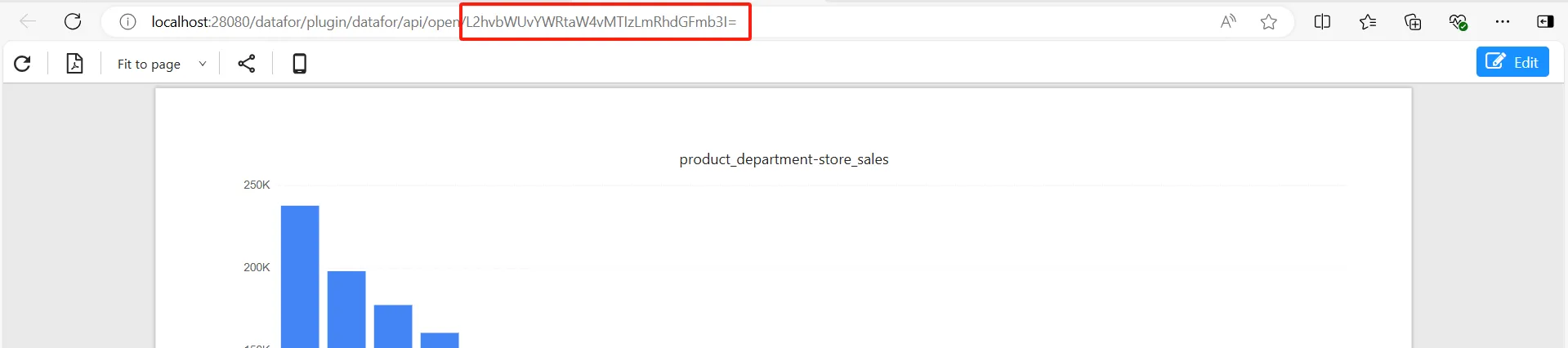
- The report ID is the last part of the address in the browser’s address bar.
Method 2: Generate using code
-
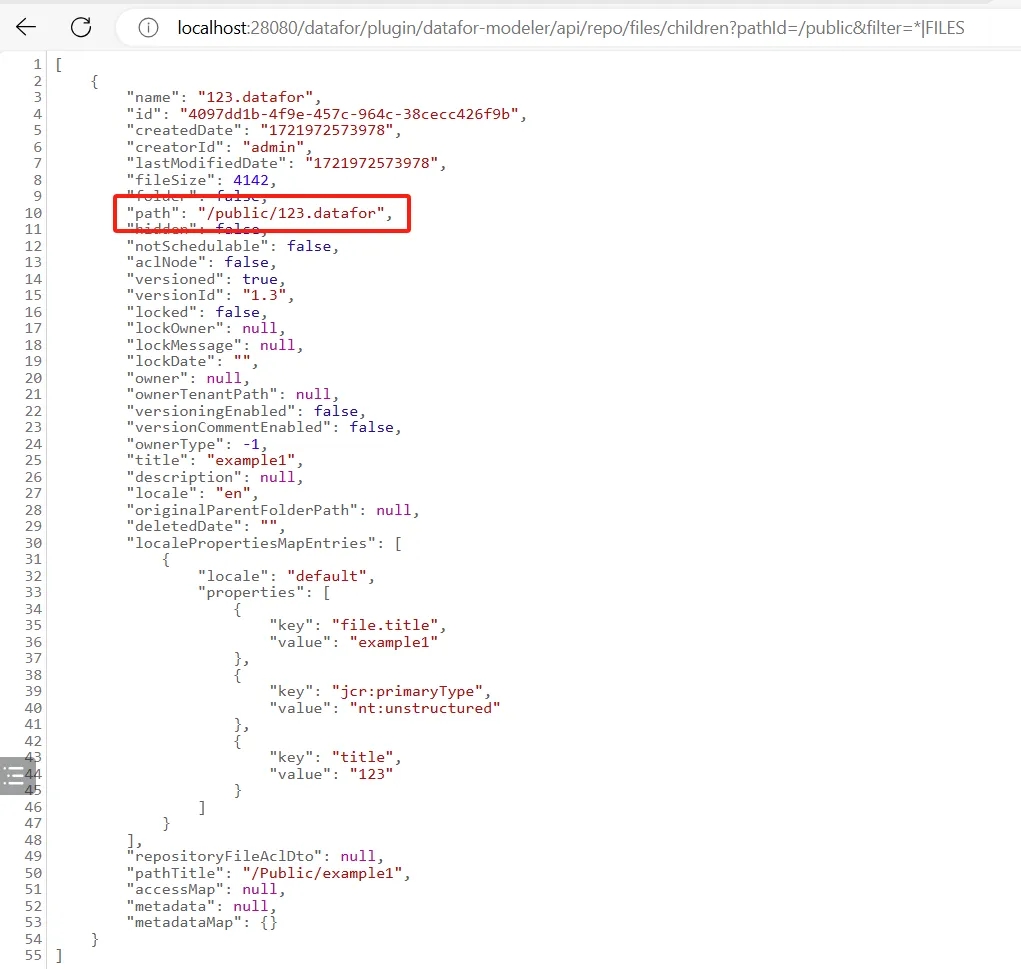
Use the API to get the file path.
For example:
http://your-server:28080/datafor/plugin/datafor-modeler/api/repo/files/children?pathId=/public&filter=*|FILES
-
Encode the path with Base64, replacing
+with-and/with_:window.btoa(unescape(encodeURIComponent("/public/123.datafor"))).replace(/\+/g, "-").replace(/\//g, "_");