
AI Agent
AI Agent Shared Secret
How the AI Agent and Datafor share the secret that lets users who are not administrators use LLMs configured in Datafor, where Datafor looks for it, and how to set, verify and change it in co-located and split deployments.
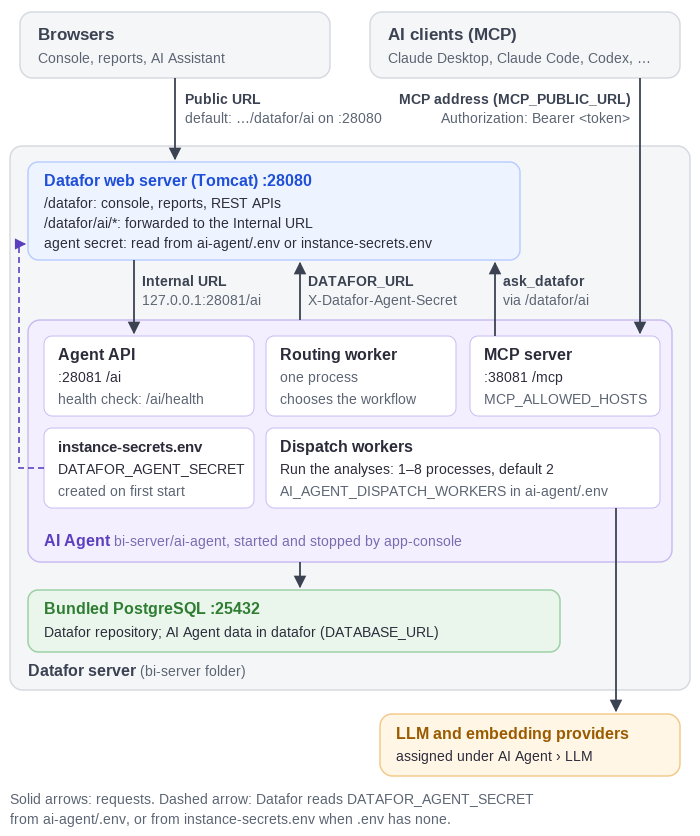
Datafor returns the full configuration of an LLM configured in Datafor, including its provider API key, only to administrators and to callers that present the shared secret in the X-Datafor-Agent-Secret request header. Everyone else, including users who are allowed to use that model, gets a copy without api_key, apiKey and extra_params (which can hold custom authentication headers).
The AI Agent reads model configurations with the signed-in user’s session. It therefore needs the same secret as the Datafor server: without a matching value, features that use an LLM configured in Datafor fail for users who are not administrators.
The value is called DATAFOR_AGENT_SECRET on both sides. This guide applies to Datafor 10.01 and later. In 10.00 Datafor kept its copy in <agent-secret> in the modeler’s settings.xml; 10.01 no longer reads that element (see Upgrading from 10.00).
1. Who is affected
The questions you ask on the AI Agent page use the model profiles assigned to the Agent stages on the LLM page (see LLM Configuration) and do not depend on the secret. Some features fall back to an LLM configured in Datafor when their Agent stage has no assignment, and only those need it:
- AI insight on dashboards (stage Dashboard Review);
- the model’s welcome brief and sample questions (stages Model Brief and Question Suggestions), including the MCP tool
generate_sample_questions; - metadata trimming for large models.
Administrators are never affected. Keep the secret in place even when every stage is assigned, so that a later change to the assignments does not break these features for other users.
Signs that the secret is missing or does not match:
- Administrators can use these features, other users get model errors.
- The AI Agent logs in
ai-agent/logscontainget_llm_config_by_id: Datafor withheld the api_key of LLM <id>. The same line also appears when the LLM configuration in Datafor simply has no API key. - The Datafor log
tomcat/logs/pentaho.logcontainsAI service secret is not configured. Datafor logs this once per start, the first time it finds no value in any of the places listed in section 2. A value that differs from the AI Agent’s produces no Datafor warning.
2. Where each side finds the value
Datafor uses the first of these that holds a non-empty value:
- the JVM option
-Ddatafor.agent.secret=<value>; - the environment variable
DATAFOR_AGENT_SECRETof the Datafor process; DATAFOR_AGENT_SECRETinbi-server/ai-agent/.env;DATAFOR_AGENT_SECRETinbi-server/ai-agent/instance-secrets.env.
Datafor looks only in the ai-agent folder directly beside its pentaho-solutions folder, which is where the installation package puts the AI Agent. It reads the two files each time it needs the value, so a new value in them takes effect without restarting Datafor. A JVM option or environment variable takes effect only after Datafor restarts.
The AI Agent uses a non-empty DATAFOR_AGENT_SECRET from its .env if there is one, otherwise the one in instance-secrets.env. That is the same order as items 3 and 4 above, so in a co-located installation both sides always agree, as long as nothing is set on the Datafor side (items 1 and 2).
The secret is kept outside Datafor’s plugin folders, so installing a plugin update or an update package that replaces the modeler’s settings.xml does not affect it.
3. Co-located installation: nothing to set up
In the standard layout, with the AI Agent in bi-server/ai-agent, the AI Agent’s launcher creates the value and Datafor reads it from the same file. Nothing has to be copied.
- First start. The launcher (
app-console.batorapp-console.shin the AI Agent folder; on Windows also run bybi-server/start-server.batandbi-server/ai-start.bat) generates a random value of 43 characters and stores it ininstance-secrets.env. It printsgenerated … DATAFOR_AGENT_SECRET in instance-secrets.env(Windows) orGenerated in instance-secrets.env: … DATAFOR_AGENT_SECRET(Linux); the line may list other per-installation secrets too. Later starts reuse the value. - Start it with the launcher. If the AI Agent executables are started another way, for example registered directly as services, no value is generated.
- Run Datafor under the same account as the AI Agent launcher. The launcher makes
instance-secrets.envreadable only by the account that created it (on Linuxchmod 600; on Windows that account, Administrators and SYSTEM). If Datafor runs as another account it cannot read the file, and users who are not administrators get model errors. Either run both under one account, or give Datafor the value as an environment variable as in section 4.
Keep the value in one place:
- Do not set
DATAFOR_AGENT_SECRETon the Datafor side as an environment variable or JVM option in a co-located installation. Those take precedence over the files, and the AI Agent never sees them. If you need one, give it exactly the same value. - Do not define
DATAFOR_AGENT_SECRETin bothai-agent/.envandinstance-secrets.env. If the two differ, both sides use the.envvalue and the launcher prints on every start:DATAFOR_AGENT_SECRET in .env differs from the one in instance-secrets.env; this service and Datafor use the .env value. Keep it in one of the two files only.
4. Split deployment: give Datafor the value
When the AI Agent runs on another server, or in a folder other than bi-server/ai-agent, Datafor cannot read its files. Give Datafor the AI Agent’s value as an environment variable or a JVM option.
Copy the value from the AI Agent server
- Start the AI Agent once with
app-console.bat start(Windows) or./app-console.sh start(Linux), so that the value exists. - In the AI Agent folder, check
.envfirst. If it has aDATAFOR_AGENT_SECRET=line with a value, that value is the one in use. - Otherwise open
instance-secrets.envand copy the text afterDATAFOR_AGENT_SECRET=.
If neither file has it, the AI Agent is older than 10.00 or was not started with its launcher.
Treat the value like a password. Move it over a secure channel, and do not paste it into email, chat or support tickets.
Set it on the Datafor server
Use one of these for the account or service that runs Datafor:
| Where Datafor runs | Set | Survives a Datafor update package? |
|---|---|---|
| Linux or Windows, started by a service or your own script | Environment variable DATAFOR_AGENT_SECRET in the service definition (for example Environment= in a systemd unit) or in the system environment |
Yes |
| Docker | -e DATAFOR_AGENT_SECRET=<value> on docker run, or environment: in Compose |
Yes |
| Any, by JVM option | -Ddatafor.agent.secret=<value> added to CATALINA_OPTS in start-server.sh or start-server.bat |
No: an update package replaces start-server.* and set-env.*. Add it again after each update. |
Then restart Datafor. Prefer the environment variable: it survives updates and does not show up in the process list the way a JVM option does.
5. Verify and change the secret
Verify
- Compare the values. The AI Agent’s value is a non-empty
DATAFOR_AGENT_SECRETin its.envif there is one, otherwise the one ininstance-secrets.env. Datafor’s value is the first one found in the order of section 2. They must be identical. Do not share them while comparing. - Split deployment: check that Datafor has been restarted since you set the environment variable or JVM option.
- Optional functional test. It proves something only if a feature actually falls back to an LLM configured in Datafor, that is, if one of the stages in section 1 has no assignment. Asking questions on the AI Agent page never uses the secret. As a user who is not an administrator, use such a feature, then check that the AI Agent logs have no new
Datafor withheld the api_keyline.
Change it
Features for users who are not administrators fail until both sides match again, so use a low-traffic window.
- Delete the
DATAFOR_AGENT_SECRETline frominstance-secrets.env, and make sure.envdoes not define the key; otherwise no new value is generated. Leave the other lines of the file alone. - Restart the AI Agent with
app-console.bat restartor./app-console.sh restart. Userestartwithout a target, so that the MCP server restarts too;app-console restart agentleaves the MCP server running with the old value. - Co-located: nothing else. Datafor reads the new value from the file at its next request. Split deployment: set the new value on the Datafor server as in section 4 and restart Datafor.
6. Moving the AI Agent
- One value per installation. Do not copy
instance-secrets.envor its values from one installation to another. - Moving the AI Agent next to Datafor (into
bi-server/ai-agent): Datafor reads the files from then on. Remove the environment variable or JVM option you set for the split deployment, or keep it equal to the AI Agent’s value, because it takes precedence over the files. - Moving the AI Agent to another server: set the value on the Datafor server as in section 4.
7. Upgrading from 10.00
Upgrade the Datafor modeler plugin and the AI Agent together. A 10.00 modeler still reads only settings.xml, which the 10.01 launcher no longer writes.
| Your 10.00 setup | After the upgrade |
|---|---|
| Co-located, value written by the launcher | Nothing to do. The value is already in instance-secrets.env, which Datafor now reads. This includes a value the 10.00 launcher took over from a hand-edited settings.xml. |
Split deployment, <agent-secret> set by hand in settings.xml |
Action needed. 10.01 ignores the element. Set the same value as an environment variable or JVM option (section 4) and restart Datafor, or users who are not administrators get model errors. |
| Split deployment, environment variable or JVM option | Nothing to do. |
An <agent-secret> element left in settings.xml is ignored; you can delete it.
8. Troubleshooting
| Symptom | What to check |
|---|---|
Administrators are fine, other users get model errors, and the AI Agent log has Datafor withheld the api_key |
Compare the values as in section 5. Common causes: a Datafor environment variable or JVM option left over from an earlier setup overrides the files; .env and instance-secrets.env differ; Datafor runs under an account that cannot read instance-secrets.env. If the values match, check that the LLM configuration in Datafor has an API key. |
| Other users started failing right after the upgrade to 10.01 (split deployment) | The value was in settings.xml, which 10.01 no longer reads. Set it as an environment variable (section 4) and restart Datafor. |
tomcat/logs/pentaho.log has AI service secret is not configured |
Datafor found no value. Co-located: check that bi-server/ai-agent/instance-secrets.env exists (start the AI Agent once with its launcher) and that the Datafor account can read it. Split: section 4. |
For the AI Agent connection settings of a separately installed AI Agent, see How to Enable the AI Feature.