
Model
Time Semantics and Default Time Settings
Datafor has three time settings with different purposes. Configure the setting used by each consumer; one setting does not substitute for another.
| Setting | Configure it on | What it controls |
|---|---|---|
| Time Semantic role | An Attribute | Identifies Year, Quarter, Month, Week, or Date levels for time-aware report and MDX behavior. |
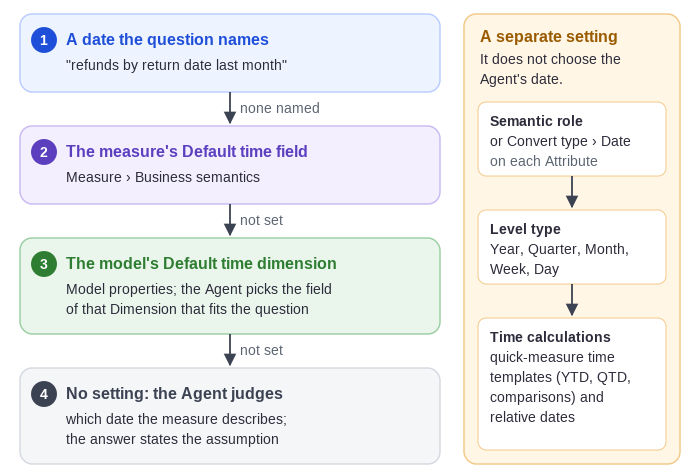
| Default time field | A Measure or calculated measure | Tells the Agent which date context to use for that Measure. |
| Default time dimension | Model properties | The model-wide date context. The Agent uses it for Measures without a Default time field. It does not replace Attribute time roles. |
Configure a time Dimension
- Select the Dimension in the model tree.
- Set Dimension category to Time.
- Include the Attributes needed for the intended calendar or fiscal time structure.
- Create a hierarchy in broad-to-detailed order, such as Year → Quarter → Month → Day, with Time: Date assigned to the Day Attribute.
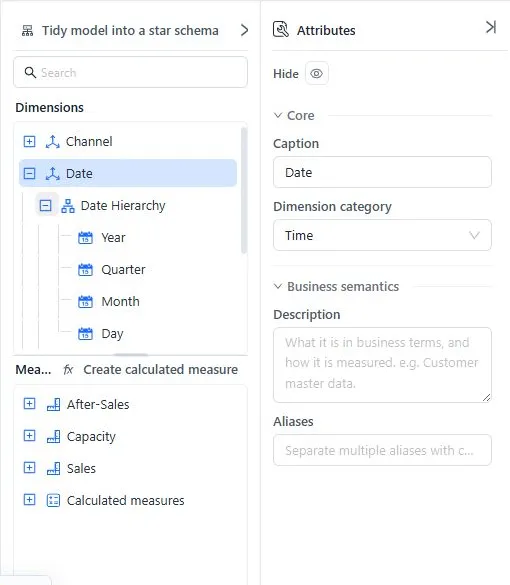
For each time Attribute, select the matching Semantic role:
| Attribute meaning | Semantic role |
|---|---|
| Year | Time: Year |
| Quarter | Time: Quarter |
| Month | Time: Month |
| Week | Time: Week |
| Calendar date or day | Time: Date |
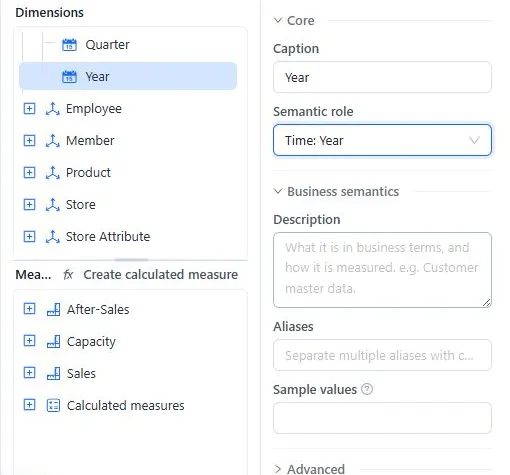
A caption such as “Year” does not make an Attribute time-aware; assign the Semantic role.
You can also set the time level from the model tree: open the Attribute’s Actions menu and choose Convert type → Date → Year, Quarter, Month, Week, Day, or Datetime. Convert type → String or Number turns a time Attribute back into a non-time Attribute.
Source column format
Every time Attribute needs a Source column format (in the Attribute’s Advanced settings) that matches how the value is stored in the source column. The list offers the formats for the Attribute’s time level; you can also type a pattern. Examples:
| Stored value | Time level | Source column format |
|---|---|---|
2005 |
Year | yyyy |
20051 |
Quarter | yyyyq |
Q1 |
Quarter | 'Q'q |
200506 |
Month | yyyyMM |
2005-06 |
Month | yyyy-MM |
2005-27 (week 27) |
Week | yyyy-ww |
20050615 |
Day | yyyyMMdd |
2005-06-15 |
Day | yyyy-MM-dd |
If a time Attribute has no format when you save, the model shows “The … in dimension … has no date format”. You can still choose Continue to save, but set the format so that time functions and relative dates resolve correctly.
Week levels must use the same first day of the week as Settings › General › System configuration › First day of the week; otherwise “this week” can resolve to the wrong member.
Set the model’s Default time dimension
With no model-tree object selected, use Model properties > Default time dimension to designate the primary time Dimension in model metadata.
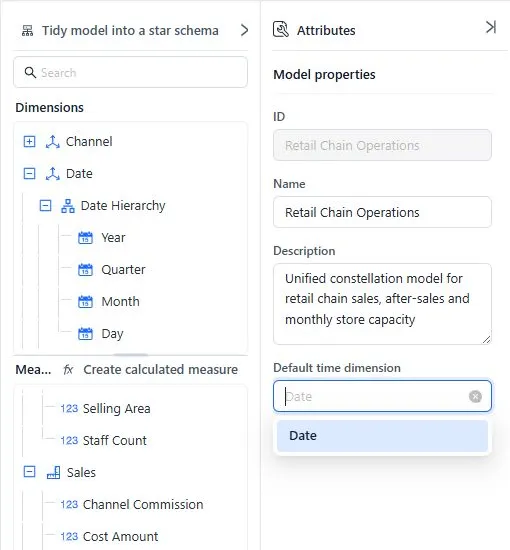
The Agent uses this Dimension as the date context for Measures that have no Default time field of their own: a question such as “sales this year” is read against a date field of this Dimension. If the selected Dimension is later removed, the value can appear as no longer exists; clear or reselect it and review Model diagnostics.
If the intended Dimension is not available in the list, confirm that it is visible and contains at least one Attribute, then set Dimension category to Time. Assign the time Semantic roles as a separate step so its Attributes work correctly in time-aware queries.
Set the Agent’s time field for each Measure
Select a Measure or calculated measure, expand Business semantics, and choose its Default time field. Select the Attribute or hierarchy level that represents when that Measure occurs.
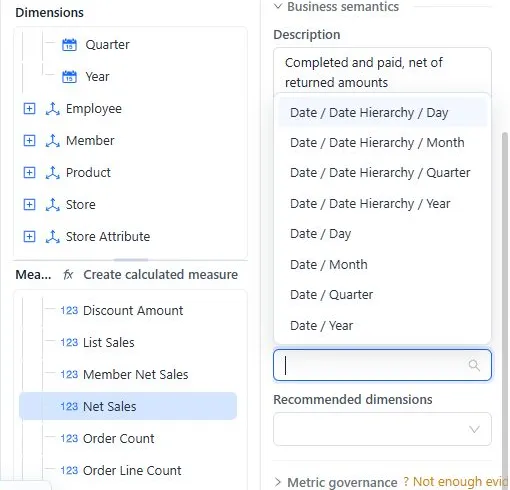
Examples:
- Net sales normally use the order or transaction date.
- Refund Measures may use return date rather than order date.
- Inventory snapshots use the snapshot date.
Set this value independently for Measures with different date meanings. A Measure’s own setting takes precedence over the model’s Default time dimension, and a date the user names in the question wins over both. Measures without a setting use the model’s Default time dimension. With neither setting, the Agent judges which date the Measure describes and the answer states that assumption.
Models with several date roles
When one date source serves several roles:
- Clone the date table and give each alias a role-specific name, such as Order Date or Ship Date.
- Create a separate relationship from each alias to the correct fact-table key.
- Expose role-specific Dimensions and hierarchies.
- Assign each Measure’s Default time field to the correct role.
See Advanced Relationship Modeling for role-playing aliases.
Time-intelligence checks
- Keep hierarchy levels ordered from the broadest period to the individual date.
- Assign an explicit time Semantic role to every time level used in calculations.
- Verify the Source column format when the source does not use a native date value.
- Test year-to-date, quarter-to-date, and period-comparison calculations at more than one hierarchy level.
- When multiple time hierarchies exist, select explicit time fields in Measures and calculation templates. Zero-argument YTD and QTD functions use the first eligible time hierarchy; the model’s Default time dimension does not choose it.
- Review Model diagnostics after renaming or removing a time Dimension, Attribute, hierarchy, or level.
Troubleshooting
| Symptom | Check |
|---|---|
| A time Dimension is missing from Default time dimension | Visibility, at least one Attribute, and the Time category; then verify its time Semantic roles. |
| The Agent uses the wrong date | The affected Measure’s Default time field, not only the model setting. |
| Time calculations use the wrong hierarchy | Time Semantic roles, hierarchy order, and explicit time-field selections. |
| A setting shows no longer exists | Reselect or clear the stale reference, then run Diagnostics. |