
Analysis
Relative Date Filtering
Filter by periods that move with today's date or with a Date component, in the Date component, list filters and component filters, and build custom relative rules.
A relative period, such as Last Month or Year to Date, is computed from the viewer’s current date each time the report opens or refreshes, so the report never needs a manually updated date.
You can use relative periods in three places:
| Where | Setting | Use it for |
|---|---|---|
| Date component | Default value → Relative | A date range or period that readers can still change. |
| Dropdown, List box, Button group, Radio/Checkbox on a year, quarter, month, week or day field | Default value → Relative | Preselecting the current, previous or latest period in a member list. |
| Component filter | Data → Filters → +, then Filter type → Relative | A fixed rule on one chart, such as the last 12 months, counted from today or from the period chosen in a Date component. See Relative component filters. |
Presets
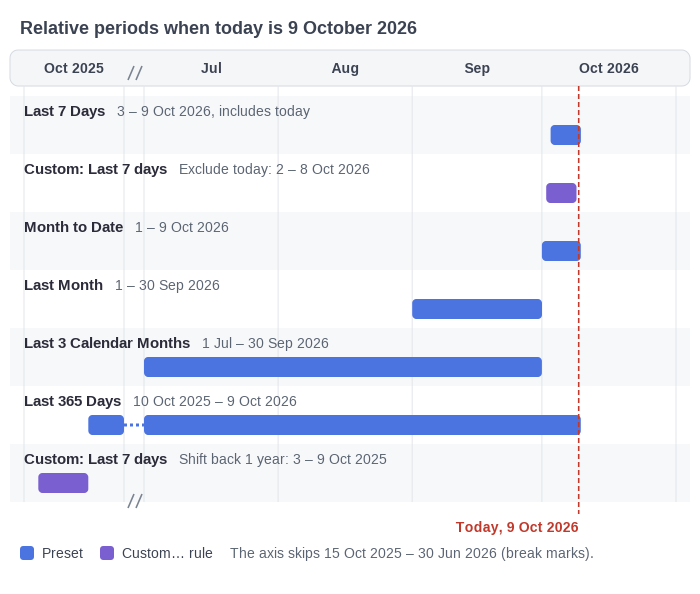
Each preset name means one exact range:
| Group | Presets (range selection) |
|---|---|
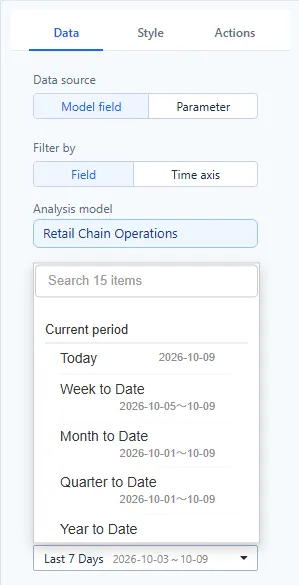
| Current period | Today, Week to Date, Month to Date, Quarter to Date, Year to Date, This Year to Last Month |
| Recent | Yesterday, Last 7 Days, Last 15 Days, Last 30 Days, Last Month, Last 2 Months, Last 6 Months, Last 365 Days |
| Calendar months and years | This Month, This Quarter, This Year to This Month, Last 2/3/6/12/24/36 Calendar Months, This Year, Last Year, Last 2/3/10 Years |
- Last N days, months or years include today: on 9 October 2026, Last 7 Days is 3–9 October and Last 365 Days is 10 October 2025 – 9 October 2026.
- Last N Calendar Months are whole calendar months, while Last 365 Days is a rolling window; Month to Date is the current month up to today. Check the range shown next to each preset.
- The list in the Date component shows the range each preset resolves to today, so you can check it before saving.
Custom rules
At the end of every relative list, Custom… builds a rule from parts:
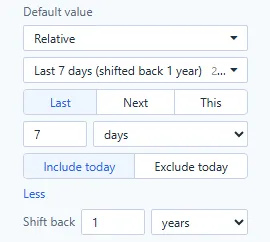
- Direction: Last, Next or This for a range; Current, Back or Ahead for a single period.
- Number and unit: 1–9999 days, weeks, months, quarters or years, never finer than the field.
- Rolling (exactly N units back from today) or Calendar (whole units); not offered for days, which always count back from today. For This: To date or Whole period.
- Include today / Exclude today (or the current week, month… for calendar units).
- More → Shift back: move the whole range back, for example the last 7 days, one year ago.
Examples:
| Question | Rule |
|---|---|
| The last three full months | Last · 3 · months · Calendar · Exclude current month |
| The same month last year | Back · 12 · months (single period) |
| The last 7 days a year ago | Last · 7 · days · Include today · Shift back 1 year |
Relative component filters
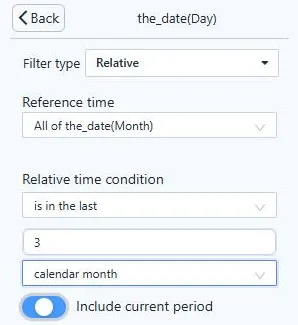
A Relative component filter (Data → Filters → +, then Filter type → Relative) keeps a period counted from a reference: today, or the period chosen in a Date component on the same page. Choose a Relative time condition (is in the last, is in this, is in the next), a number and a unit, then click Apply.
Reference time
| Reference time | The reference is |
|---|---|
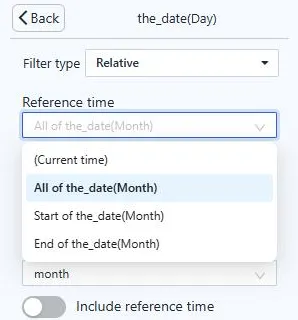
| (Current time) | Today. With the hour, minute or second unit, the current hour, minute or second. |
| A single-period Date component | The period selected in it: a day, or a whole week, month, quarter or year at the component’s granularity. |
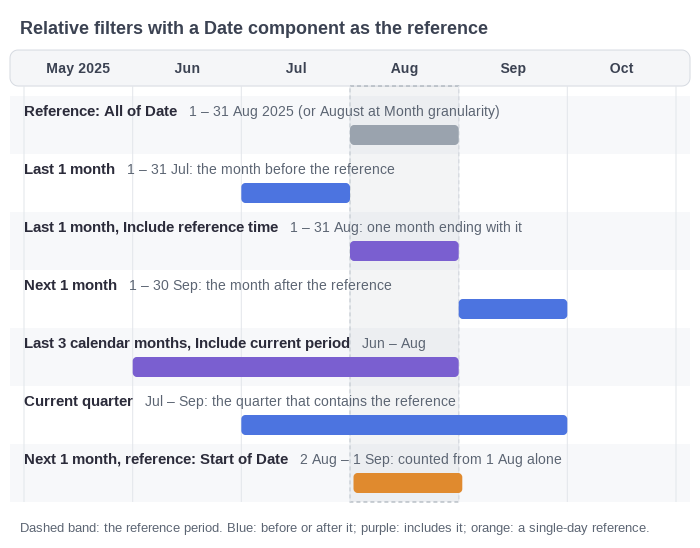
| All of a range Date component | The whole selected range, for example 1–31 August. This is the default for a range Date. |
| Start of / End of a range Date component | Only the first or the last period of the range. |
Readers change the result by changing the Date component; the chart’s rule stays the same. Older reports that referenced a range Date without choosing its start or end show All of it.
How the period is counted
| Condition | Result |
|---|---|
| is in the last N units | The N units just before the reference. |
| is in the last N units, Include reference time | N units that end with the end of the reference. |
| is in the next N units | The N units just after the reference. |
| is in the next N units, Include reference time | N units that start with the start of the reference. |
| is in this unit | The whole week, month, quarter or year that contains the reference. |
| is in the last N calendar units | N whole units before the one that contains the reference. With Include current period: N whole units ending with the current one, up to the end of the reference. |
| is in the next N calendar units | N whole units after the one that contains the reference. With Include current period: from the start of the reference to the end of the (N−1)th unit after it. |
Include reference time never adds a period: the window is always N units long and only moves to end or start with the reference. Calendar units offer Include current period instead.
With (Current time) on 30 October 2026:
| Rule | Period |
|---|---|
| Last 7 days | 23–29 October |
| Last 7 days, Include reference time | 24–30 October |
| Last 1 month | 30 September – 29 October |
| Last 1 month, Include reference time | 1–30 October |
| Last 3 calendar months | July – September |
| Last 3 calendar months, Include current period | 1 August – 30 October |
- A Date component at Month granularity with August selected and a Day range Date set to 1–31 August give the same results.
- Month ends are counted from the day itself, as in the presets: Next 1 month from 29 January 2024 is 30 January – 29 February.
- The number of units is at least 1.
Things to check
- No data yet. A relative period after the last loaded date returns no data. In a list filter the period is shown in red with a strikethrough and still applied; charts say No data under the current filters, and the chart’s Conditions button shows the range.
- Weeks start on the day set in Settings › General › System configuration › Modeling › First day of the week.
- Older reports: Last 7 Days and the other Last N presets cover one day less than before 10.00, and Last Year, Last Month, Last Quarter, This Year to Last Month and Year to Date were corrected for edge cases.
- Older relative component filters may return a slightly different period: Include reference time now covers exactly N units (one day fewer than before); a calendar unit is no longer moved by an include setting that was hidden for calendar units; a count of 0 counts as 1; and last N hours relative to the current time ends at the current hour instead of at midnight.
- Time zones: fixed dates of a Date component are saved as calendar dates, so readers in other time zones see the same dates. Dates in reports saved earlier are converted when the report opens; save the report once to store them in the new format.
- URL values win: a default passed in the URL replaces the relative default on the first load.
- List filters and single-period Date components that filter by a field also offer Latest period, the most recent period that has data. It does not move with today’s date; see Latest period in list filters and in the Date component.
Related: Date · Dropdown, List Box, Button Group and Radio/Checkbox · Time Semantics and Default Time Settings