
Release notes
v9.00 Release Notes
Release date: June 2026
Datafor 9.00 is a major release. It rebuilds the AI Assistant on a new agent runtime, redesigns the report editor and the management console, introduces AI user licensing, adds the KPI Trend Card, and delivers a large set of query-engine performance and stability improvements.
Highlights
1. AI Assistant rebuilt on a new agent runtime
The conversational analysis preview introduced in 8.00 has been replaced by a new AI Assistant. It opens from the AI Agent card on Home and from the report editor toolbar.
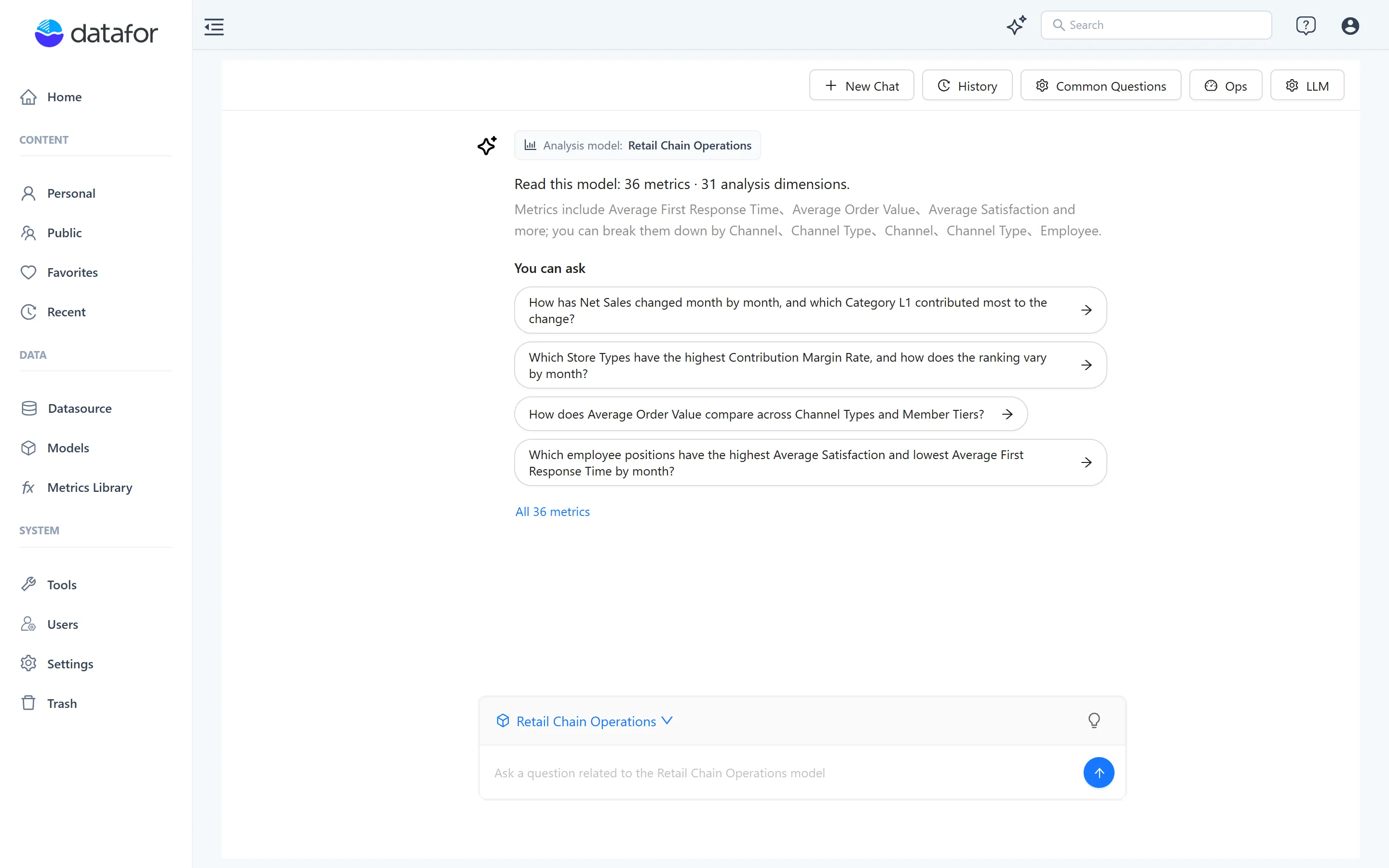
What changes for users:
- Streaming answers with visible progress. Each stage of the analysis (understanding the question, matching it to the model, querying, concluding) is shown while it runs.
- Multi-turn conversations. Follow-up questions build on the previous result: “only East China”, “break it down by month”, “last year”, “top 10”, or “switch the metric”. Suggested follow-up questions appear under each answer.
- Clarification instead of guessing. When a metric, filter value, or time field is ambiguous, the Assistant asks and offers candidates; the analysis resumes from your answer.
- Complex questions. A question that needs several queries is planned as a small set of steps. The result of every step is shown, and the conclusion is built only from those results.
- Model welcome card. After selecting an analysis model you see a model brief, the number of metrics and dimensions, and suggested questions. Quick Actions start guided analyses (metric check, trend, breakdown, comparison) without typing a question.
- Better results. Automatic chart recommendation, KPI cards for single-value results, stacked, funnel and line charts, percentage formatting, relative-time handling, and calculated-measure aware questions with shortcut calculation templates (growth, share, ratio).
- History. Conversations can be reopened and replayed.
- Language. Questions are understood in the user’s language and answered in the same language.
For administrators, the new Common Questions page maintains the suggested questions of each model, and a Semantic maintenance workflow maintains business-friendly names, synonyms and descriptions of the dimension fields and business metrics the Assistant relies on.
AI Assistant · Common Questions · Business Semantics for AI
2. LLM management and metadata retrieval
- Redesigned LLM configuration. Multiple model profiles on OpenAI-compatible endpoints (including GPT-5.5 class models), a connection test, and default assignment of models to the agent’s roles. Development and production use the same configuration model.
- Hybrid metadata retrieval. Model metadata is retrieved with vector search combined with business-term grounding, which reduces mismatches between the words in a question and the fields in the model.
- Vector index management. Indexes can be deleted and rebuilt from the AI Agent settings; embedding authentication failures are reported instead of failing silently.
LLM Configuration · Preparing Data for AI
3. AI user licensing
Licenses now carry an AI users capacity in addition to Creator and Reader seats; Settings → System → License shows the three capacities side by side. Administrators enable the AI Assistant per user with the Enable AI Agent switch in Users; the number of AI-enabled users is checked against the license, and AI features (assistant, insights) are only shown to enabled users. Multi-tenant deployments refresh the capacity per tenant.
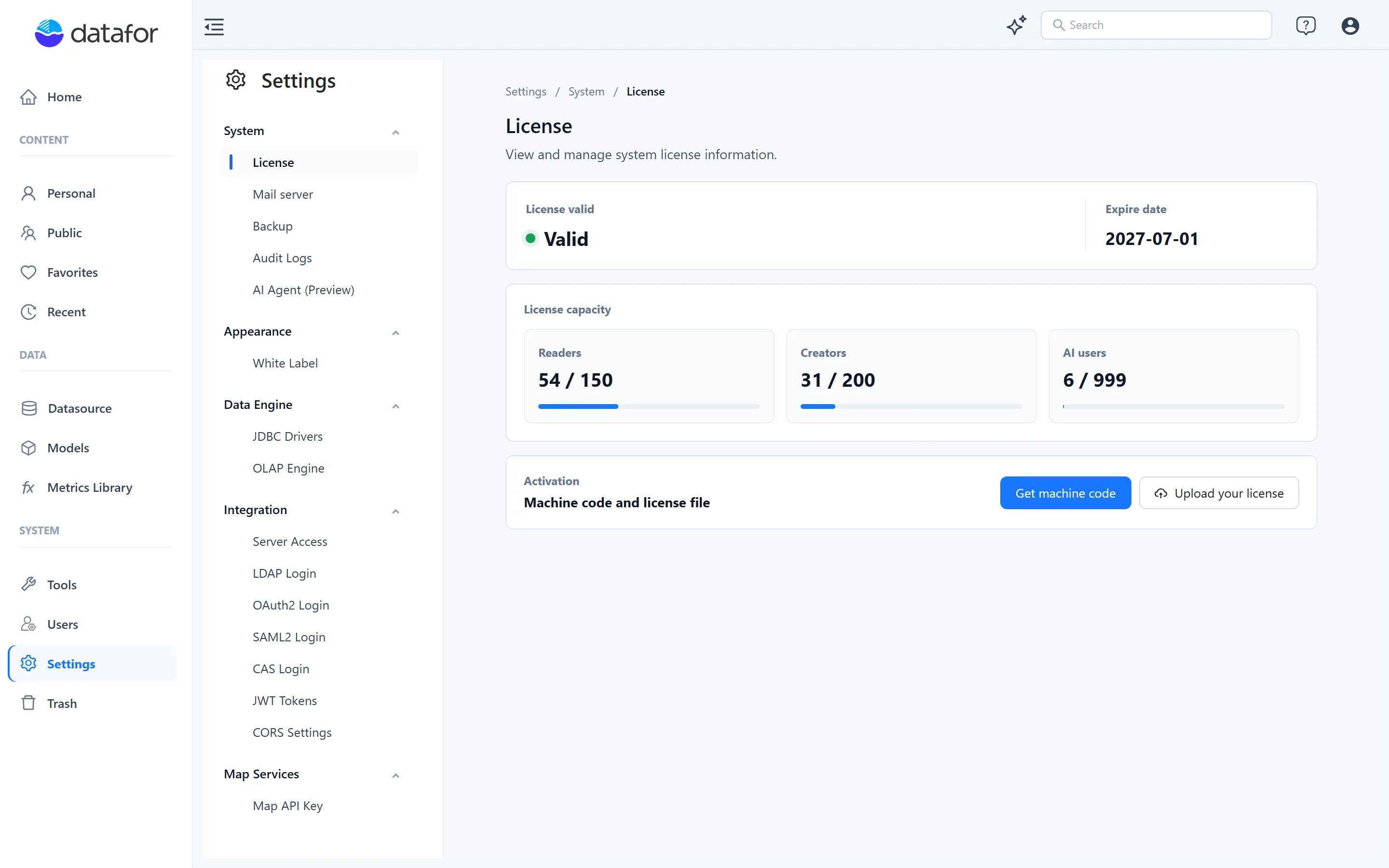
Upgrade note: after upgrading, existing users are not AI-enabled. Enable the users who should have access to the AI Assistant.
4. Redesigned report editor
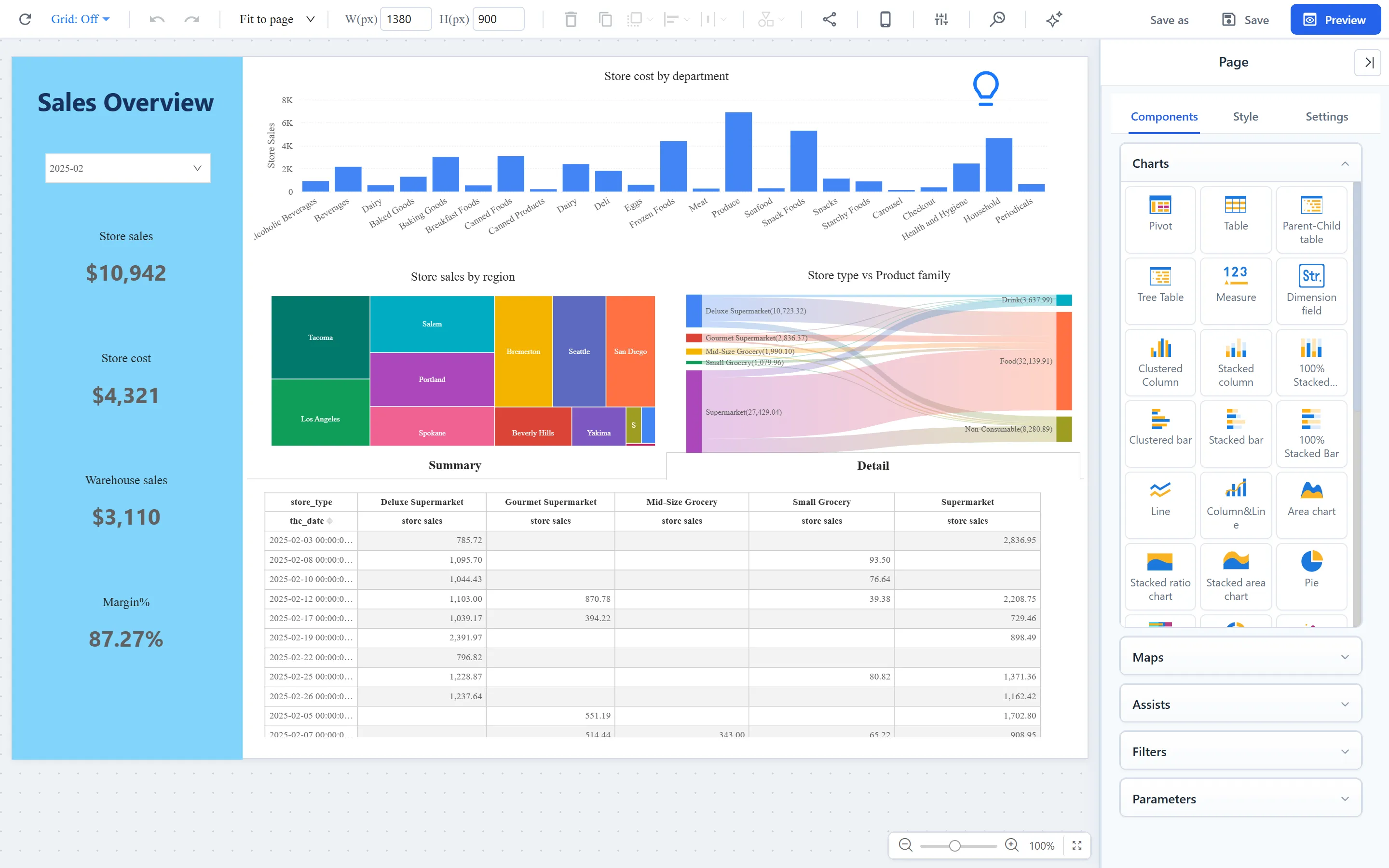
- New Style, Data and Components panels with consistent typography, faster rendering and single-column chart lists.
- Redesigned toolbar and unified dialogs (Save, Save As, confirmations).
- Snap to grid and alignment guides while dragging; cleaner selection outlines.
- Fit to page and automatic canvas fit to the window.
- Redesigned Actions → Interactions panel with a Linked components picker.
- The filter area can be resized by dragging.
- Components with auto-refresh show a reminder while the report is being edited.
- Interface translations updated for all supported languages.
5. Mobile layout designer
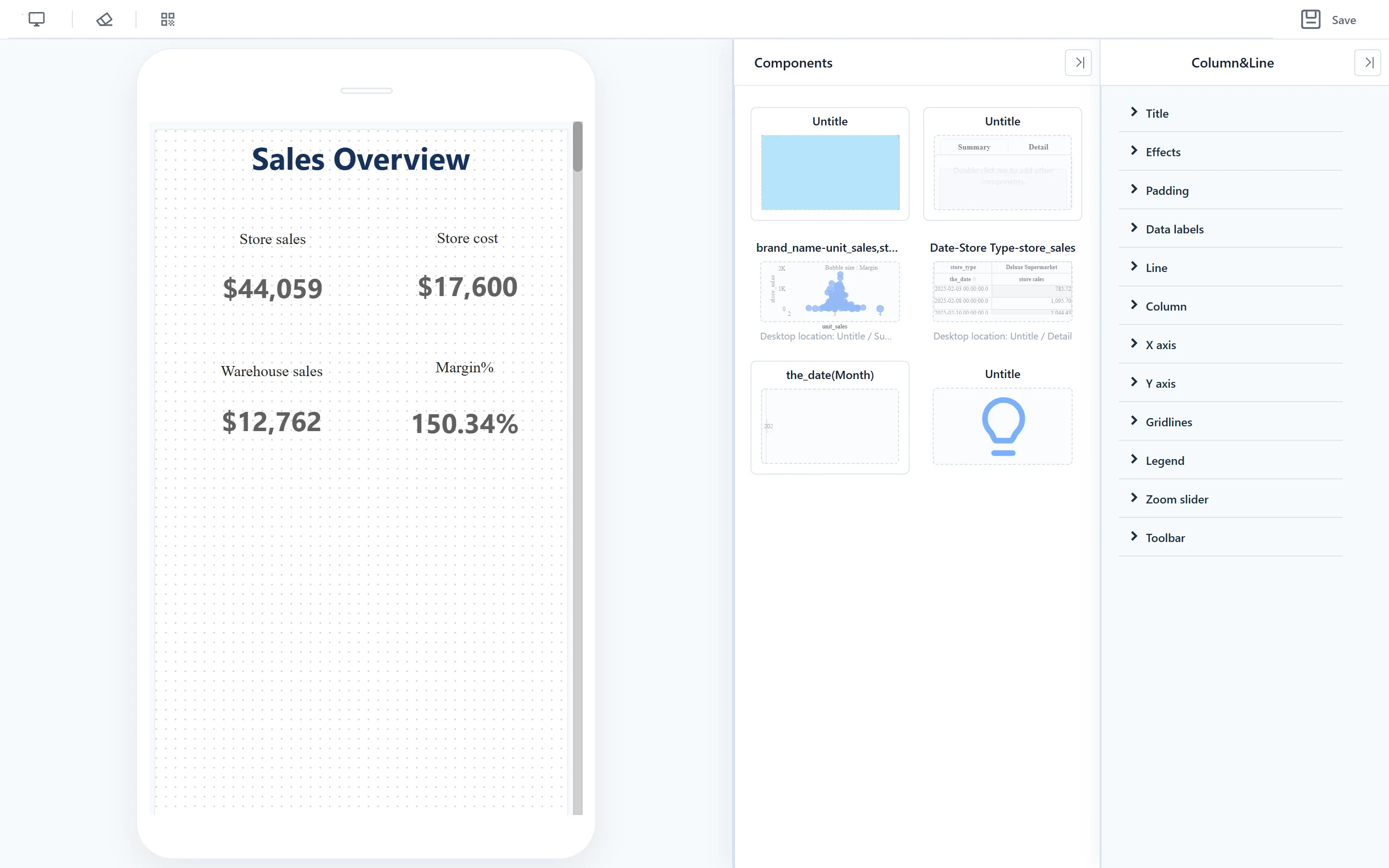
The mobile layout designer was rebuilt: a component list that shows where each desktop component lives, free drag and resize on a device-width canvas, collapsible panels, per-component style settings that apply only to the mobile layout, and improved root-canvas zoom and drag.
6. New component: KPI Trend Card
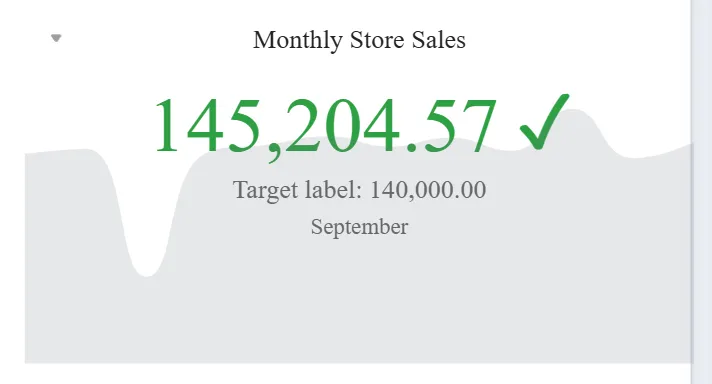
A card that shows the current value of a KPI, compares it with a target (a target measure or a static target), colors the status by direction (higher or lower is better, evaluated against the target or the previous value), and draws a trend area over a time or category dimension. Marker value, unit, status icon and fonts are configurable.
7. New management console
The web console was rebuilt with a new Home, login page and navigation.
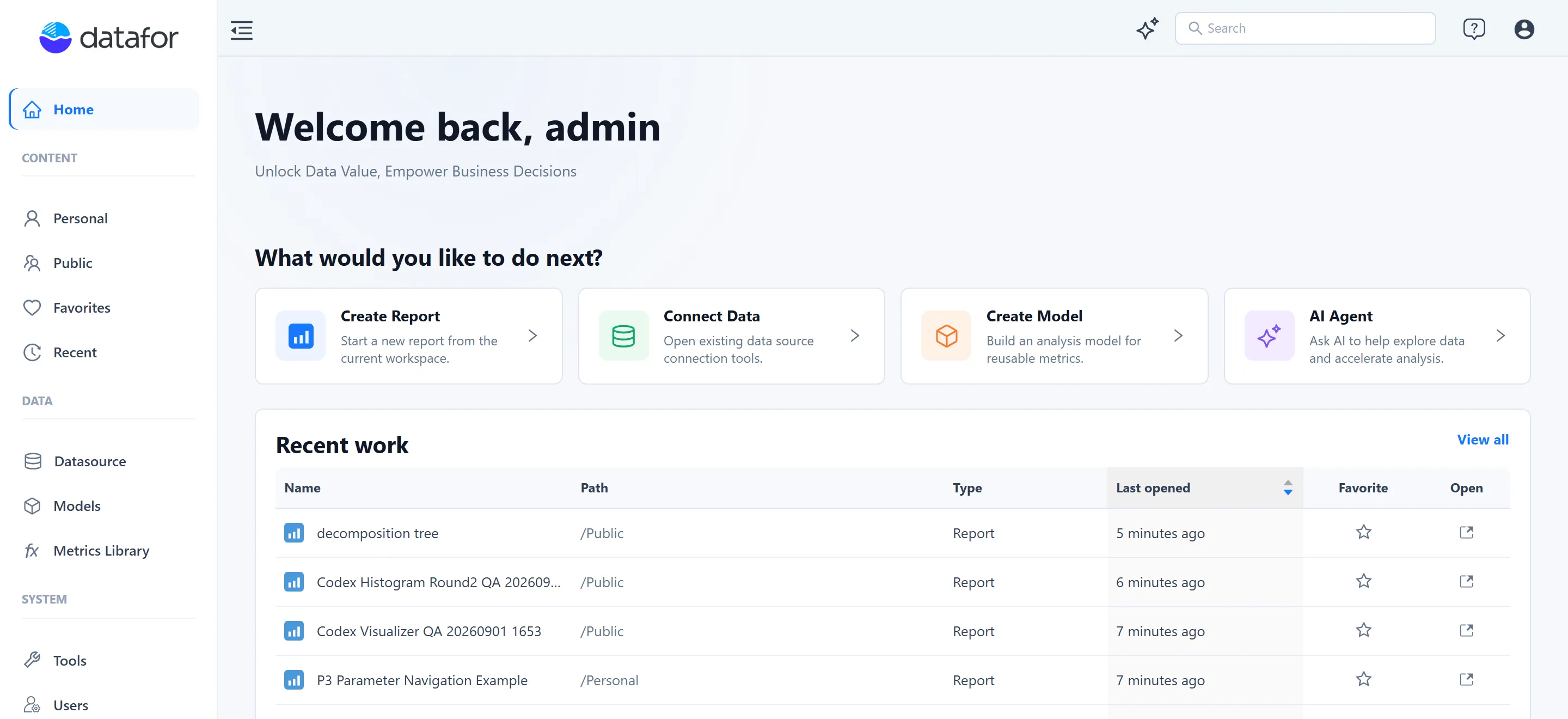
- Home offers quick actions (Create Report, Connect Data, Create Model, AI Agent) and Recent work, which now includes analysis models. Models can be marked as favorites.
- Settings uses secondary navigation; the JDBC drivers, OAuth2, CORS and white-label pages were redesigned.
- Users: new create/edit dialog, user import with attachment validation, export of selected users.
- Models, Datasource and other resource lists use inline actions, fixed action columns, consistent loading states and dialogs.
- Access control layout was reworked; delete and cache-clearing actions ask for confirmation.
8. SDK and embedding
initialFilterValuessets the default values of filter components when a report is embedded (read-only/preview mode).- URL
default_parameters can be injected into date pickers, date ranges and flat selectors; several SDK crashes were fixed.
SDK Embedding · Pass Parameters Through URL
Model designer
- Refreshed layout and attribute panel; a minimap for large canvases.
- The model tree scrolls to the field selected on the canvas.
- Time levels of attributes are recognized and used as defaults for the default time field of measures.
- Annotation names were normalized (Datafor prefixes removed, values trimmed), producing cleaner metadata for AI.
- Excel import: date formats are recognized correctly, and a type change that fails is reported as a warning instead of blocking the import.
Performance and stability
Query engine (Mondrian):
- Batched cell requests are deduplicated; pure-dimension table queries on multi-fact models are significantly faster.
- Relationship semantics (1:1, 1:n, n:1, m:n) are used when generating SQL. One-to-many and many-to-one joins no longer trigger whole-table
GROUP BYsubqueries; de-duplication is only applied to real many-to-many links. - Fact Count is resolved from the measure group whose fact table is directly related to the dimensions on the axes.
- Memory: tuple cache retention is capped, native tuple materialization releases its references, and cell request keys are retained for a shorter time.
- Native aggregate and slicer constraints are preserved correctly (fixes wrong totals when aggregate requests are combined with filters); constant crossjoins get a fact anchor; calculated-member filter expansion is bounded.
- Time levels stored as epoch milliseconds are converted correctly; numeric native filters return a clear error message; schema relation loading is deterministic.
- A repeatable MDX regression suite guards these paths.
Platform:
- Metadata lists are cached per tenant user; license checks in
fetchUserare faster; BouncyCastle is no longer required at runtime for license validation. - Result cache:
datafor.query.cache.result.enable=trueno longer raises errors, and null values are no longer cached in dynamic queries. - The simplified query API used by the AI Agent returns detailed error information and enforces row limits; annotations and measure expressions are exposed in metadata.
Important bug fixes
- Excel/CSV export of custom components no longer returns “no data”; time-axis selections are restored when a report is reopened.
- Custom blocks: spacing, position offset, missing selection state and abrupt loading fixed.
- Clustered column data labels, color mapping and overflow scrolling in panels fixed.
- Character-set handling for JavaScript resources fixed (server configuration).
- First-screen “error code” flash, wrong “fit to screen” target, toolbar overlap and slider thumb alignment fixed.
- Report title shown white-on-white in the top bar, stale white-label logo cache, and user export fixed.
- File dataset Excel import: date recognition and type handling fixed.
- Version check failures no longer flood the log.